

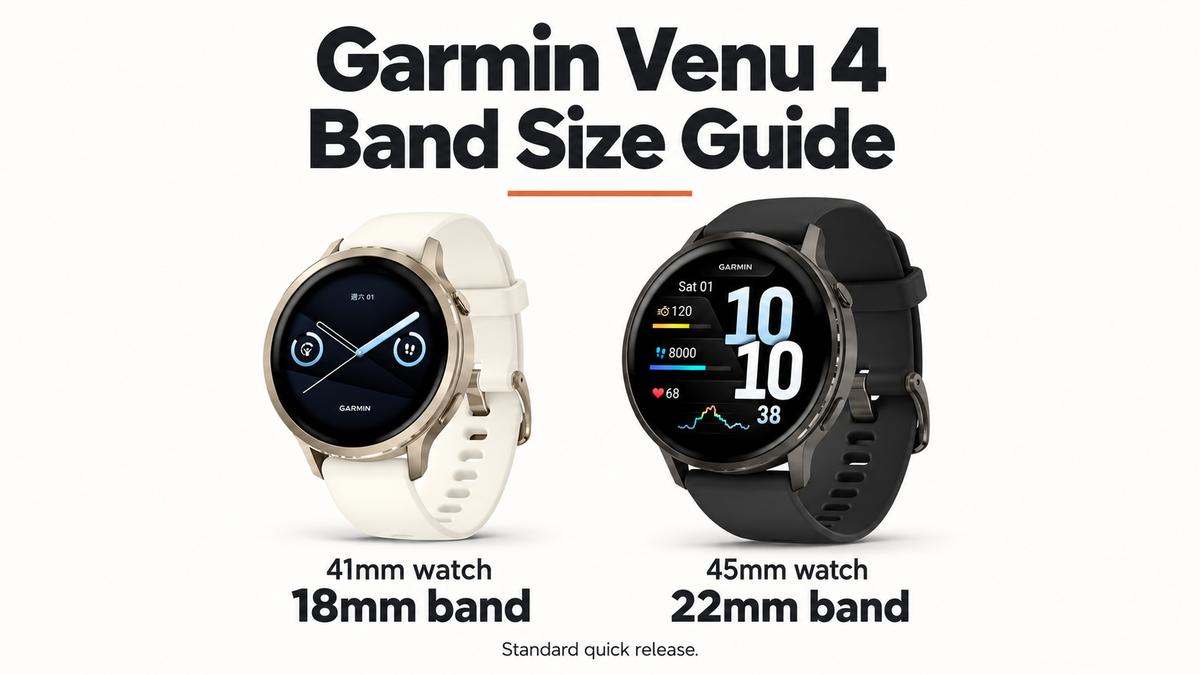
The Garmin Venu 4 watch band size is 18mm for the 41mm watch and 22mm for the 45mm watch. Both models use standard quick-release bands. You do not need a Garmin QuickFit strap.
If you are upgrading from a Venu 3 or Venu 3S, you may already have a band with the right specifications. A Venu 3 band shares the 45mm Venu 4's 22mm width; a Venu 3S band shares the 41mm model's 18mm width. The connector and shape of the band end still need to fit the new watch.
Here is how to choose the correct width, check an old strap and find a replacement that also fits your wrist.
In this guide
Garmin Venu 4 watch band size chart
Garmin confirms the two sizes in its Venu 4 band-changing instructions.
| Venu 4 model | Band width at the watch | Attachment |
|---|---|---|
| 41mm case | 18mm | Standard quick release |
| 45mm case | 22mm | Standard quick release |
The Venu 4 41mm band size is therefore 18mm, even if you need a long strap for a larger wrist. The Venu 4 45mm band size is 22mm, including when the watch is worn on a smaller wrist.
The numbers refer to different parts of the watch. 41mm and 45mm describe the case; 18mm and 22mm describe the strap's attachment width. Neither number tells you how long the band is.
A listing offering 18mm, 20mm and 22mm usually contains separate variants. Select the correct width before adding it to your cart. One physical strap does not adjust between those attachment sizes, and 20mm is not the specified width for either Venu 4.
How to check your Venu 4 size
Confirm the case size
Look for 41mm or 45mm on your original order confirmation, packaging or the product details from your purchase. If the order simply says "Venu 4," check the exact version before ordering a replacement band.
Photographs are a poor guide to case size. The two watches have similar designs, and a close-up can make either look large. Wrist circumference will not identify the watch, either: someone with a small wrist may have chosen the 45mm model.
Measure at the watch end of the band
If you have the watch in front of you, remove one band half and measure the gap between the inside faces of the lugs. The lugs are the two projections holding the spring bar. Measure across the opening in millimeters with a ruler or caliper.
You can also measure the original strap where it joins the watch. Keep the ruler square to that edge. Some bands narrow toward the buckle, so measuring the middle of the strap or the buckle opening can give you a different number.
A marking on the underside may help, but confirm what it describes. A buckle size and a watch attachment size are not always the same. For Venu 4, the measurement at the watch should agree with the 18mm or 22mm specification above.
Garmin Venu 4 band compatibility with older Venu models
You do not necessarily need a new band when changing watches. Several Venu generations use the same published width and standard quick-release attachment.
| Your existing band | Published width | Shares the Venu 4 41mm standard? | Shares the Venu 4 45mm standard? |
|---|---|---|---|
| Venu 3S | 18mm | Yes | No |
| Venu 3 | 22mm | No | Yes |
| Venu 2S | 18mm | Yes | No |
| Venu 2 | 22mm | No | Yes |
| Venu 2 Plus | 20mm | No | No |
| Original Venu | 20mm | No | No |
All the older models in this table use standard quick release. Their widths come from Garmin's Venu 3/3S, Venu 2/2S, Venu 2 Plus and original Venu manuals.
Moving a Venu 3 or Venu 3S band to Venu 4
A straight-ended, standard quick-release Venu 3 band has the same 22mm specification as the Venu 4 45mm. The equivalent smaller-watch pairing is Venu 3S and Venu 4 41mm, both 18mm.
This is a match between published specifications, rather than a guarantee for every aftermarket design. Bands with molded ends, integrated cases or special adapters can depend on the shape of a particular watch. Check the band maker's compatibility details for those designs.
Before reusing a strap, inspect the spring bars and the material around them. A bent bar, damaged lever or torn attachment should be replaced. Once fitted, both ends must seat securely without forcing the band between the lugs.
Our Venu 4 vs Venu 3 comparison covers the watches themselves if you are still deciding whether to upgrade.
Why Venu 2 Plus bands are different
The Venu name alone is not enough to establish compatibility. Venu 2 Plus uses 20mm bands, so its straps do not share either Venu 4 width. The original Venu also uses 20mm. A collection labeled "Venu bands" may include all three widths because it covers several generations.
Quick Release vs QuickFit: what should you buy?
Choose standard quick release for Venu 4. On this type of band, a small lever near the watch end retracts one tip of the spring bar. The bar fits between the watch lugs.
QuickFit works differently. Garmin's QuickFit instructions describe a latch that closes over a watch pin. A product labeled "22mm QuickFit" should not be treated as a Venu 4 replacement just because the width matches the larger watch.
The two descriptions you are looking for are:
- 41mm Venu 4: an 18mm standard quick-release band.
- 45mm Venu 4: a 22mm standard quick-release band.
Look at the underside photographs as well as the product title. Some listings use "quick release" loosely to describe any tool-free attachment. The connector supplied with your chosen variant is what matters. If a listing mixes QuickFit and standard quick release without showing which is which, ask the seller before ordering.
For a closer look at the hardware, see our Garmin QuickFit vs Quick Release guide.

Choose a band length that fits your wrist
Band width is fixed by the watch. Band length is a separate choice. Two straps with the same 22mm attachment can have very different wearable ranges.
Wrap a flexible tape measure around the part of your wrist where the watch sits. Keep it snug without pulling it tight. If you use a strip of paper instead, mark the overlap and measure the strip against a ruler.
Compare that measurement with the product's stated wrist range for your selected width and length. A 160mm wrist is outside a listed 165–180mm range, even if the attachment is correct. Do not assume every color or width in a product listing has the same length options.
With a buckle strap, consider where your measurement falls within the adjustment range. Being able to move a hole tighter or looser is more useful than depending on the final hole. For a fixed loop, check whether it stretches and whether the seller specifies a wrist range or simply the unfastened strap length.
Closure and material also change how the band adjusts. A woven strap with hook-and-loop fastening can be set differently from a nylon strap with buckle holes. Silicone bands can have different hole spacing and tail lengths. Leather care requirements vary, so check the maker's guidance if you expect frequent water exposure.
These details can help you choose between bands that already have the correct connector. They cannot make a wrong-width strap fit.
Choosing a Venu 4 replacement band
For a replacement, the most useful product information is the attachment width, connector type, supported watch model and wearable wrist range. Color and texture are easier to choose once those details are clear.
For the 45mm Venu 4
Look for 22mm standard quick release. You can compare designs in Bandletic's Venu 4 watch band collection, then open the individual product page to check its connector and wrist sizing. Select the 22mm variant; a 20mm option in the same listing is a different size.
For any band with a shaped end, confirm that the maker lists your Venu 4 version. A broad "Garmin compatible" label is less useful than an explicit size and connector description.
For the 41mm Venu 4
Look for 18mm standard quick release and a wrist range that includes your measurement. If a design is only offered in 20mm or 22mm, choose a different band rather than the nearest width.
An existing 18mm straight-end Venu 3S or Venu 2S band is also worth checking before buying another strap. Use the compatibility table above and inspect its hardware before moving it across.

How to change the Venu 4 band
Garmin's band-changing instructions use the quick-release lever, so a suitable standard quick-release band can be changed by hand. Work over a soft surface with enough light to see the lug holes.
- Turn the watch over and find the small lever on the underside of one band half.
- Slide the lever to retract the spring bar. Lift that half away from the watch.
- Place one spring-bar tip of the replacement into a lug hole.
- Hold the release lever to retract the other tip and align it with the opposite hole.
- Let go of the lever. Gently move the band to make sure both tips have engaged, then give it a light pull.
- Repeat for the other half and check both attachments before wearing the watch.
If a band pulls free, sits at an angle or will not fit between the lugs, remove it and check the alignment and size. Do not trim the strap or bend the hardware to make it fit. A click alone does not prove that both spring-bar tips have seated.
Follow the band maker's orientation instructions for the buckle and longer half. Keep the old band until you have checked the replacement's fit and closure on your wrist.
Garmin Venu 4 band size FAQs
1. Do Venu 3 bands fit Venu 4?
Venu 3 and Venu 4 45mm share the 22mm standard quick-release specification. Venu 3S and Venu 4 41mm share the 18mm specification. Straight-ended bands with suitable hardware are the relevant candidates for reuse; molded ends and integrated designs need their own compatibility check.
2. Can I use a 20mm band on a Garmin Venu 4?
Neither Venu 4 model specifies 20mm. The 41mm case takes 18mm and the 45mm case takes 22mm. A 20mm strap sold for another Venu model is not a substitute.
3. Are all 22mm Garmin bands compatible with Venu 4?
No. The 45mm Venu 4 needs the correct standard quick-release attachment as well as the right width. A 22mm QuickFit band or a connector molded for a different watch is not automatically compatible. The 41mm Venu 4 needs 18mm instead.
4. Does the Venu 4 use QuickFit bands?
Garmin specifies standard quick-release bands for both Venu 4 sizes. Choose 18mm for the 41mm model or 22mm for the 45mm model, and check the actual connector rather than relying on a generic "quick-change" description.
5. Is the band width the same as the buckle width?
Not necessarily. A strap can taper toward the buckle. The buying size in this guide is the width at the watch end, which is 18mm or 22mm depending on your Venu 4.
6. What if the band fits the watch but feels too loose?
Check the wearable wrist range and closure adjustment. You may need a shorter version of the same width, rather than a narrower strap. Measure your wrist and compare it with the selected variant's sizing details.
Share:
Best Apple Watch Band for Running: Fit, Sweat & Security