

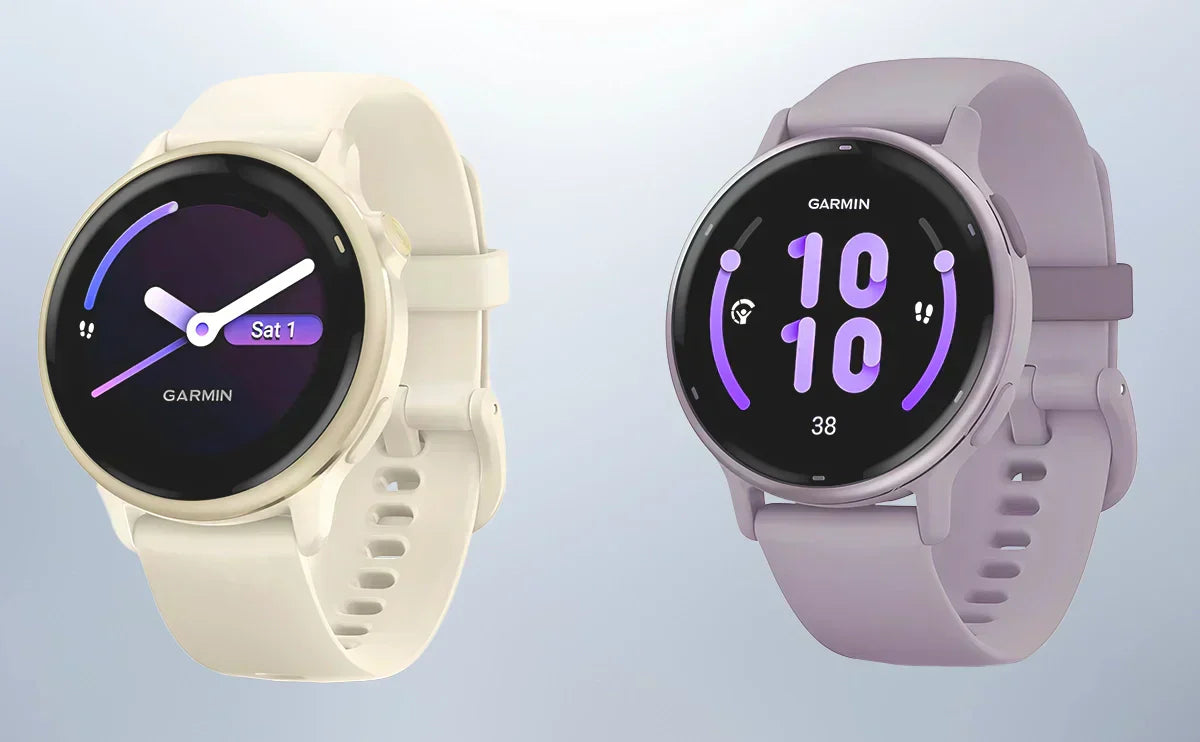
Vivoactive 6 is worth considering if you will use Smart Wake, PacePro, additional running metrics or more space for offline music. A working Vivoactive 5 still covers much of the everyday experience, including HRV Status, sleep coaching, Garmin Coach and music playback.
The Garmin Vivoactive 5 vs 6 decision depends on what is missing from your current routine. Their screen size, weight, band connection and official battery ratings are largely the same. Buying the newer model solely for a larger screen or longer rated battery life would not deliver either benefit.
Contents
- Vivoactive 5 vs 6: The Quick Answer
- Specifications and What Stays the Same
- Interface, Storage and Everyday Smart Features
- Smart Wake and Health Tracking
- Running Features: What Vivoactive 6 Adds
- GPS and Navigation Limits
- Battery Life: Compare the Same Mode
- Should Vivoactive 4 or 4S Owners Upgrade?
- Band Fit: Both Use 20mm Quick Release
- Upgrade Value: Keep Your Watch or Buy the Newer One?
- Garmin Vivoactive 5 vs 6 FAQs
Vivoactive 5 vs 6: The Quick Answer
| Your situation | Start with | Why |
|---|---|---|
| Your Vivoactive 5 handles your workouts and daily tracking | Keep Vivoactive 5 | Many core features and all the battery ratings below are shared |
| You want race pacing and more running data | Vivoactive 6 | PacePro, running dynamics and running power expand the tools available |
| You want a sleep-based alarm or larger offline music library | Vivoactive 6 | Smart Wake and 8GB storage address those specific needs |
| You are buying your first Garmin and find a substantial Vivoactive 5 discount | Compare both | Decide whether the added features justify the actual price gap |
| You use a Vivoactive 4 or 4S for altitude and floors climbed | Check the tradeoffs first | Neither 5 nor 6 retains the older series' barometric altimeter |
Vivoactive 5 is also a reasonable choice for regular running. It supports GPS recording, interval workouts and Garmin Coach plans. Vivoactive 6 adds options for pacing and reviewing a run; those options matter most when you intend to use them.
Specifications and What Stays the Same
The two watches are close in physical size. Vivoactive 6 is 0.2mm thinner, while their listed weights and display dimensions match.
| Specification | Vivoactive 5 | Vivoactive 6 |
|---|---|---|
| Case dimensions | 42.2 × 42.2 × 11.1mm | 42.2 × 42.2 × 10.9mm |
| Weight, watch only | 23g | 23g |
| Weight with included band | 36g | 36g |
| Display | 1.2-inch AMOLED | 1.2-inch AMOLED |
| Resolution | 390 × 390 pixels | 390 × 390 pixels |
| Lens | Corning Gorilla Glass 3 | Corning Gorilla Glass 3 |
| Bezel | Anodized aluminum | Anodized aluminum |
| Case material | Fiber-reinforced polymer | Fiber-reinforced polymer |
| Controls | Touchscreen and two buttons | Touchscreen and two buttons |
| Listed storage | 4GB | 8GB |
| Listed GNSS constellations | GPS, GLONASS, Galileo | GPS, GLONASS, Galileo, BeiDou, QZSS |
| Band connection | Standard 20mm quick release | Standard 20mm quick release |
| Included-band wrist range | 125–190mm | 125–190mm |
| Water rating | 5 ATM | 5 ATM |
Both provide wrist-based heart rate, Body Battery, stress tracking, sleep scores, sleep coaching, nap detection, HRV Status and Morning Report. Garmin Pay, downloadable music and Connect IQ support are also shared. Vivoactive 5 already offers these features; they are not all reasons to replace it.
Garmin describes Vivoactive 6's display as brighter. Screen size and resolution remain the same, however, so the change gives you neither a larger viewing area nor more pixels. If outdoor readability is your main reason to upgrade, try both with the display settings you intend to use.

Interface, Storage and Everyday Smart Features
Vivoactive 6 changes how menus and activity settings are organized. Its current manual describes swiping left from the watch face to open apps and activities, then selecting an activity and scrolling down to its settings. On Vivoactive 5, the action button opens the activities and apps menu.
Both watches let you customize activity data screens. Vivoactive 6's data-screen instructions cover tapping a field, choosing its content and reordering screens. Vivoactive 5's instructions also allow layout changes and field editing.
For a run, you might put pace, distance and heart rate together, then give lap data a separate page. Compare whether you can find and read the information you use. Try starting your usual activity and changing a data field on each watch; the newer menu may take some adjustment if you are used to the 5.
Storage rises from 4GB to 8GB. That gives Vivoactive 6 more capacity for downloaded content, particularly useful if you rotate several playlists for phone-free workouts. The listed capacity is total device storage, not a promise that every gigabyte is available for music. Both watches require compatible Bluetooth headphones for listening; supported streaming services may require a subscription.
Phone compatibility still matters. Both show notifications from a paired phone. Native text responses depend on Android, and Vivoactive 6 adds an on-watch keyboard. Do not expect the same native reply options on iPhone. Accepting an incoming call notification also does not turn either watch into a phone: the conversation uses your connected phone.

Smart Wake and Health Tracking
Smart Wake is a documented Vivoactive 6 addition. It uses a 30-minute window before the alarm time to attempt a sleep-based wake-up. For an 8:00 a.m. alarm, that window is 7:30–8:00 a.m. Garmin states that the alarm will still go off at the selected time.
This is not an alarm that can postpone your wake-up indefinitely. It may suit someone who wears the watch overnight and has some flexibility to wake earlier. If you want a fixed-time vibration alarm, Vivoactive 5 already provides that. See Garmin's Smart Wake explanation.
For everyday trends, the overlap is substantial. Both track sleep and overnight HRV, and both can summarize your morning. Neither provides skin-temperature tracking or Garmin's ECG feature. A claim that Vivoactive 6 adds those capabilities would confuse it with other Garmin models.
Vivoactive 6's current documentation also includes Health Status and Lifestyle Logging. These can help you review changes from your usual overnight readings and relate logged habits to your data. Health Status needs three weeks of wear to establish its baseline. These tools add ways to organize information; they do not establish that its heart-rate or sleep measurements are more accurate than Vivoactive 5's.

Running Features: What Vivoactive 6 Adds
Vivoactive 5 can record GPS distance, time and pace, show cadence, guide interval workouts and follow Garmin Coach running plans. It also estimates VO2 max and recovery time. You do not need Vivoactive 6 simply to train consistently for a 5K or half-marathon.
Vivoactive 6 adds tools that make a difference when you want more guidance during a run or more detail afterward.
| Running tool | Vivoactive 5 | Vivoactive 6 | Why it matters |
|---|---|---|---|
| GPS distance, time, pace and cadence | Yes | Yes | Covers the core information for recording a run |
| Garmin Coach running plans and custom workouts | Yes | Yes | Helps organize training without creating every session from scratch |
| VO2 max estimate and recovery time | Yes | Yes | Adds context for fitness trends and the next hard session |
| PacePro | Not listed | Yes | Provides pacing guidance for a chosen course or distance |
| Wrist-based running dynamics beyond cadence | Not listed | Yes | Adds measures such as stride length, vertical oscillation and ground contact time |
| Garmin running power | Not listed | Yes | Adds an estimated effort measure in watts |
| Workout Benefit | Not listed | Yes | Summarizes the purpose and effect of a completed workout |
PacePro: useful when you have a pacing plan
PacePro is one of the clearer reasons to choose Vivoactive 6. You can plan pacing for a distance or course and follow split guidance during the activity. Course-based strategies can account for elevation and your pacing preferences. Garmin's PacePro instructions explain the setup.
It is useful if you tend to start too quickly or want a plan for a rolling course. If you run by feel and rarely check split targets, it may add little to your routine.
Running dynamics and power: know which data needs an accessory
Vivoactive 6 calculates several running-form metrics at the wrist. Garmin specifies that ground contact time balance requires a compatible running-dynamics accessory. Do not assume the watch alone provides every metric in the running-dynamics table.
Running power can come from the watch sensors or a compatible accessory. It estimates effort using several inputs; it is not a direct measurement of force. Its value depends on whether you intend to use power targets in training. See Garmin's running dynamics and power documentation.
Workout guidance: check the workflow you want
Vivoactive 6 documents daily suggested walking workouts and supports downloadable workouts and running plans. Its current manual also describes race-event guidance, including daily suggestions after adding an event and establishing the required activity data. Keep the software current and check the setup for the particular plan or suggestion you want.
The broader activity menu includes mobility workouts and additional outdoor profiles. Choose based on activities you will record, rather than treating the number of sports profiles as a performance score.

GPS and Navigation Limits
Separate three questions: can the watch record a route, guide you toward a location, and provide the mapping tools you need?
Vivoactive 5 records GPS activities, saves locations and provides compass-based navigation back to the start. Garmin's Back to Start instructions describe an arrow pointing toward your starting location. That arrow does not show the roads or trails needed to get there.
Vivoactive 6's current manual documents course navigation, including courses sent from Garmin Connect, following a course in reverse and viewing its line on a map screen. It also documents TracBack and Straight Line options for returning to the start. See course details and the map description. Older launch reviews may not reflect these current instructions.
A course line is useful for following a planned route. It should not be treated as confirmation of full offline street or topographic maps, automatic route calculation or rerouting around a blocked path. If those are essential, check a model that explicitly lists them.
Both watches have a compass. Vivoactive 6 adds a gyroscope and lists additional GNSS constellations, including BeiDou and QZSS. More satellite systems should not be confused with multi-band positioning, and the specification list does not establish a measured accuracy advantage over Vivoactive 5.
Battery Life: Compare the Same Mode
Garmin gives the two watches the same headline ratings. The usage mode matters more than the generation number.
| Mode | Vivoactive 5 | Vivoactive 6 |
|---|---|---|
| Smartwatch mode | Up to 11 days | Up to 11 days |
| Always-on display | Up to 5 days | Up to 5 days |
| Battery saver | Up to 21 days | Up to 21 days |
| GPS only | Up to 21 hours | Up to 21 hours |
| All satellite systems | Up to 17 hours | Up to 17 hours |
| All satellite systems with music | Up to 8 hours | Up to 8 hours |
These figures do not promise 11 days with continuous GPS or always-on display enabled. Music, Pulse Ox settings, brightness, notifications and GPS sessions affect actual use. A worn battery in an older Vivoactive 5 can also behave differently from a new unit.
If you track sleep, plan a charging window during the day. Buying Vivoactive 6 for a higher official battery rating alone is not supported by this table.
Should Vivoactive 4 or 4S Owners Upgrade?
Coming from Vivoactive 4 changes the decision, but it does not make Vivoactive 6 a universal upgrade.
Vivoactive 4 and 4S use sunlight-visible MIP displays. Moving to 5 or 6 brings AMOLED, newer sleep and HRV tools, and a different interface. If you prefer the older display's always-visible outdoor presentation, try AMOLED with your intended display settings before replacing it.
The older series also has a barometric altimeter and floors-climbed tracking. Neither Vivoactive 5 nor 6 retains that combination. Vivoactive 6's gyroscope does not replace an altimeter. Someone who regularly checks stairs or barometric altitude should compare another Garmin model that explicitly supports those features.
| Your Vivoactive 4/4S priority | What to consider |
|---|---|
| AMOLED, sleep coaching and overnight HRV trends | Both 5 and 6 offer a substantial change in daily use |
| PacePro and additional running metrics | 6 provides more reasons to move |
| Barometric altitude and floors climbed | Keep these requirements on your shortlist; do not assume 6 preserves them |
| A smaller 4S case | Check fit: 4S is 40mm; both newer watches are 42.2mm |
| Reusing existing straps |
4 uses 22mm, 4S uses 18mm; both newer models use 20mm |
A failing battery or a missing feature makes replacement easier to justify. If your 4 still works well, compare the capabilities you would gain with the ones you would lose.
Band Fit: Both Use 20mm Quick Release
Vivoactive 5 and Vivoactive 6 both use standard 20mm quick-release bands. You may be able to keep a correctly matched replacement band when moving between them, provided its connector, condition and adjustment range suit the new watch.
Band width is separate from wrist circumference. Garmin lists 125–190mm for the included bands; a replacement strap can have a different range. A 20mm QuickFit product should not be assumed to fit a standard quick-release connection.
Browse Bandletic Vivoactive watch bands, then confirm your exact model in the product listing. Our Garmin QuickFit vs quick-release guide explains the connector checks. If your existing watch feels uncomfortable because of its strap, resolving the fit may be enough to keep using it.
Upgrade Value: Keep Your Watch or Buy the Newer One?
For a Vivoactive 5 owner, identify one or two features you would use regularly. PacePro for race preparation, Smart Wake for overnight wear or extra music storage can justify a change. If those features would rarely affect your day, keeping the 5 is reasonable.
For a new buyer, compare current prices for new watches in the same country, with equivalent warranty and included accessories. A small price gap makes Vivoactive 6 easier to choose for its extra tools. A substantial Vivoactive 5 discount may outweigh features you do not need. Avoid comparing an old launch price with a temporary deal in another market.
For a Vivoactive 4 or 4S owner, make the altimeter, display and fit decisions first. Age alone does not settle the choice.
If training analysis is your main reason to replace a watch, compare the exact tools you need with a running-focused Garmin model. Put requirements such as Training Readiness, load analysis, controls and navigation on your shortlist before choosing by model name.
Garmin Vivoactive 5 vs 6 FAQs
1. Does Vivoactive 5 have Smart Wake?
Garmin documents Smart Wake for Vivoactive 6, while Vivoactive 5 provides standard alarms. On 6, the sleep-based window is the 30 minutes before the selected alarm time.
2. Does Vivoactive 6 add HRV Status or skin-temperature tracking?
HRV Status is available on both. Neither offers skin-temperature tracking. Vivoactive 5 also already has Morning Report and sleep coaching.
3. Is Vivoactive 6 better for running?
It offers more native running tools, including PacePro, wrist-based running dynamics and running power. Vivoactive 5 still supports regular training through GPS recording, intervals and Garmin Coach. Choose the extra tools according to how you train.
4. Does Vivoactive 6 have route navigation?
Its current manual documents saved courses, course-line display and return-to-start options. That should not be confused with a watch that explicitly provides full routable offline maps.
5. Does Vivoactive 6 last longer between charges?
The official ratings are the same in the modes compared above. Real battery life depends on settings, activity use and battery condition.
6. Can I use a Vivoactive 5 band on Vivoactive 6?
Both use standard 20mm quick release. Confirm the individual band's fit and wrist range. Vivoactive 4's 22mm and 4S's 18mm straps use different widths.
Share:
Apple Watch SE 3 vs Apple Watch Series 10 - Is the Flagship Worth the Extra $150 in 2026?
Apple Watch SE 3 vs Series 11 - Is the $150 Upgrade Worth It in 2026?