

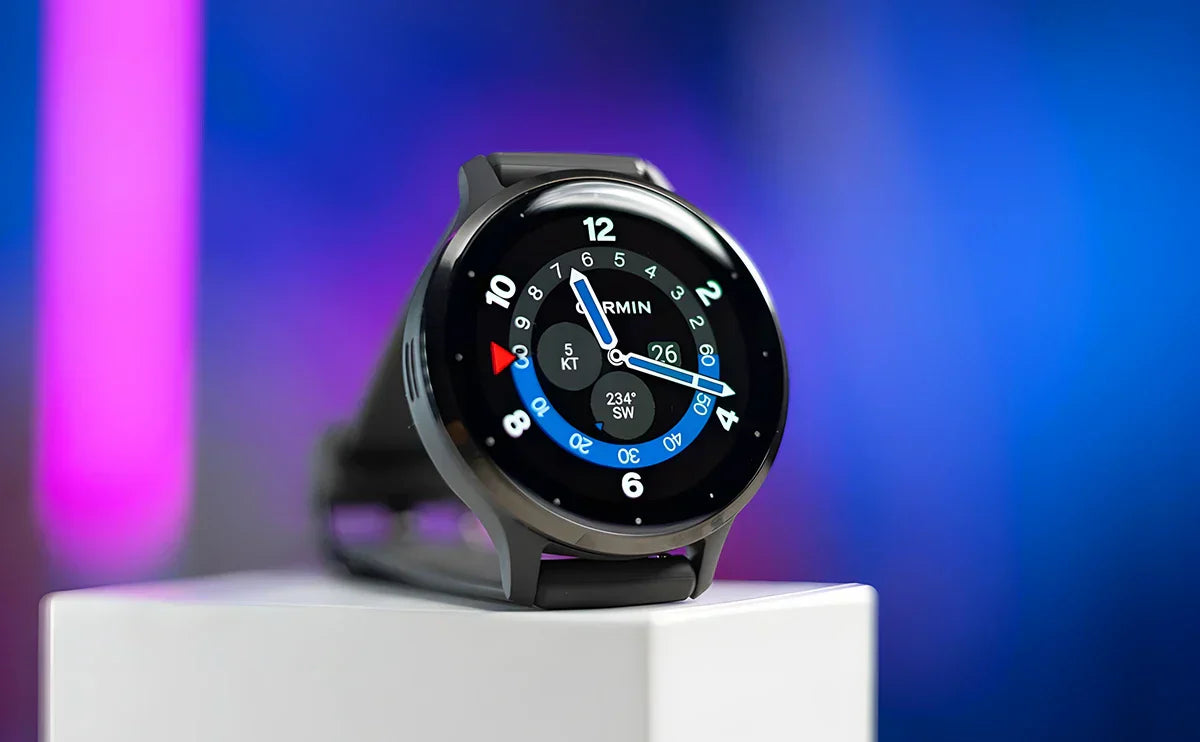
This Garmin Venu 3 review compares sleep tracking, phone-connected features and battery life across the Venu 3 and Venu 3S. The larger Venu 3 combines a 1.4-inch AMOLED display with phone-connected calls, downloaded music and a smartwatch battery rating of up to 14 days.
Our Garmin Venu 3S review favors the smaller model when a 45 mm case feels too wide. It keeps the family's main health and smart features in a 41 mm case, with a smaller screen and shorter battery ratings.
This is a specification-based review using Garmin's product information and current manuals. Bandletic has not conducted hands-on accuracy or battery testing for this article.
In this guide
Bandletic’s verdict: Garmin Venu 3 pros and cons
Venu 3 makes the most sense for someone who wants to wear one watch through the working day, workouts and sleep. Its appeal is the combination of daily health context, a readable screen, a microphone and speaker, and a smartwatch battery rating of up to 14 days. Venu 3S offers that approach in a smaller case, with an up-to-10-day smartwatch rating.
| Strengths | Trade-offs |
|---|---|
| Sleep, naps, Body Battery and overnight HRV in one platform | Sleep stages and recovery information are estimates, not a clinical assessment |
| Two case sizes with AMOLED touchscreens | The larger screen also means a larger watch on the wrist |
| Phone-connected calls and compatible voice-assistant access | No standalone LTE calling; a compatible connected phone is required |
| Music storage and Garmin Pay | Music services and payment support depend on account, bank and region |
| Long battery ratings in named modes | Always-on display, GPS and music reduce endurance |
| Useful everyday activity and running features | No multi-band GPS or Forerunner-style Training Readiness |
Core activity and health records remain available through the free Garmin Connect service. Garmin Connect+ adds optional paid features, while music providers and some third-party apps have separate terms. Garmin explains the distinction in its Connect+ announcement.
Design, display and band fit: Venu 3 vs Venu 3S
| Specification | Venu 3 | Venu 3S |
|---|---|---|
| Case | 45 × 45 × 12 mm | 41 × 41 × 12 mm |
| AMOLED screen | 1.4 in; 454 × 454 | 1.2 in; 390 × 390 |
| Weight with included silicone band | 47 g | 40 g |
| Standard quick-release band | 22 mm | 18 mm |
| Included silicone-band wrist range | 135–200 mm | 110–175 mm |
Both use a stainless-steel bezel, a fiber-reinforced polymer case and Gorilla Glass 3. Both are 12 mm thick. The three physical buttons complement the touchscreen, giving you a direct control for common actions. The glass can still scratch, so consider how the watch will be used at work or in the gym. See Garmin's Venu 3 specifications and Venu 3S specifications.
Venu 3S is worth considering if a 45 mm case feels wide, catches on clothing or is less comfortable for overnight wear. Choose the size by wrist fit and reading preference. A person with a small wrist may prefer the 3S, while someone who wants larger workout fields may accept the wider Venu 3 case.
The Garmin Venu 3 watch band size is 22 mm. Venu 3S uses 18 mm. Both take standard quick-release bands. These widths describe the attachment end; measure your wrist separately to choose the band length.
Measure your wrist and check the length range of the specific replacement band. The wrist ranges above apply to Garmin’s included silicone bands, so do not transfer them automatically to every third-party strap. When browsing Garmin Venu 3 watch bands, verify 22 mm compatibility; Venu 3S owners need an 18 mm option explicitly listed for their watch.
For the broader Garmin Venu band range, check the full model name before choosing material or color. Our Venu 3 vs 3S comparison covers the size decision in more detail. Garmin’s band-changing instructions confirm both attachment widths.

Garmin Venu 3S review: should you choose the smaller watch?
Venu 3S is the more appealing choice when the larger Venu 3 extends too far across your wrist. At 40 g with its included silicone band, it is lighter than the 47 g Venu 3. The case is smaller in diameter, with the same 12 mm thickness. That distinction matters if you expect the smaller version to sit noticeably flatter under a cuff.
The health and smart features you keep
The smaller watch retains Sleep Coach, overnight HRV Status, Body Battery, activity recording and phone-connected calls. Downloaded music and Garmin Pay are also part of the package, subject to their service and bank requirements. You are choosing a different fit and battery capacity while keeping the main functions that make the Venu family useful.
For someone who wants one watch for work, a gym session and sleep, the 3S is worth trying on first. A watch that presses against your wrist or catches when you bend your hand may end up on the charger instead of recording overnight data. Fit should be checked on your own wrist; a smaller case alone cannot guarantee comfort.
The smaller screen is the main compromise
The 1.2-inch, 390 × 390 AMOLED screen has less room than Venu 3's 1.4-inch panel. Try reading a message and the workout fields you would use. The 3S may suit your wrist while the larger watch suits your reading preference. Garmin provides font-size options, but a font setting cannot create more physical display area.
Battery life is the other trade-off: the standard smartwatch maximum is 10 days for the 3S and 14 for Venu 3. Both are rated for up to five days with the display always on. If that is your preferred setting, compare those limits before paying for the larger watch mainly for its standard-mode rating.
Who should buy Venu 3S?
Choose the 3S if you want the Venu health and phone features in a smaller case and can accept its shorter GPS and music endurance. Choose Venu 3 if display area or longer recording time matters more. Garmin lists a 110–175 mm wrist range for the supplied 3S silicone band; replacement-band lengths vary.
The 3S takes an 18 mm standard quick-release band. Venu 3's 22 mm band will not fit it. Check the model and connector before ordering a second band. Garmin's 3S product information and the battery comparison below support these size and feature distinctions.
Garmin Venu 3 sleep tracking, naps and overnight HRV
What the sleep record includes
Venu 3 and 3S record estimated sleep duration, stages, movement and a sleep score. Compare several nights to see how your bedtime and wake time change across the week. Sleep-stage estimates can add context, although a single graph cannot precisely explain every period of waking or sleep.
Set your usual sleep hours and wear the watch comfortably overnight. For someone buying the watch mainly for sleep tracking, a case and band that remain comfortable in bed deserve as much attention as the screen. Check how the watch feels with your wrist bent and while resting your arm on a pillow.
How to use the sleep information
Start with the total duration and your recorded bedtime and wake time. Compare those with what you remember. Then review the sleep score and stages across several nights. For example, you can compare the records from a regular working week with the nights after a late evening or a change in your schedule.
Keep your own notes about how rested you feel. A high score and a tiring morning can both be useful information to discuss, without assuming that either one explains the other. The watch's estimates are most useful as a record you can revisit. They cannot tell you the precise cause of poor sleep.
Sleep Coach and automatic nap detection
Sleep Coach provides guidance using information such as sleep and activity history, HRV Status and naps. Naps appear in the sleep information and can affect recovery context. The guidance is intended to help you review your routine, rather than prescribe a fixed amount of sleep for every person.
Automatic nap detection can miss or misclassify periods of rest. Compare the record with your own routine instead of treating every detected nap as a confirmed sleep measurement. Its main value is adding context to the day’s sleep and recovery information.
HRV Status uses overnight data
Garmin Venu 3 HRV Status is based on wrist heart-rate readings while you sleep. Garmin states that three weeks of consistent sleep data are needed to establish HRV Status. This is different from continuous, all-day HRV reporting, even though the watch also provides daily stress and heart-rate information.
Once a baseline is established, the status relates the recent HRV trend to your own range. The useful question is how that trend changes over time, rather than whether your number is higher than another person’s. Travel, activity and changes in routine can provide context without proving a specific cause.
Breathing information and its limits
The current manual also describes overnight breathing-variation insights when the relevant Pulse Ox sleep setting is enabled. This is a wellness feature, not a diagnosis of sleep apnea or a direct measurement of snoring. Review the setting and its battery implications before deciding to use it regularly. Sources: Garmin sleep tracking and HRV Status.

Garmin Venu 3 features: health and wellness
Garmin Venu 3 health features include daily heart rate, resting-heart-rate trends, stress, respiration and Body Battery. Venu 3S shares these tools. Reviewing the records together can help you notice how a busy day and a night of sleep appear alongside your activity history.
A two-minute Health Snapshot session records a set of readings on demand for later review. Pulse Ox has separate spot-check, sleep and optional all-day settings. Check the setting you intend to use, since the sampling mode affects the record and battery use.
The Garmin ECG app is available on supported Venu 3-series watches, with eligibility depending on the country, account and compatible software. Check Garmin’s current availability information for your location before making it a deciding factor. It is a separate on-demand feature, rather than automatic all-day ECG monitoring.
For exercise heart rate, fit, movement and the activity itself can affect wrist-sensor readings. Wrist sensing does not provide a universal accuracy guarantee against a chest strap. A secure, comfortable fit is appropriate; a looser band is not an accuracy upgrade. Consider a compatible external sensor if your preferred workout needs a different measurement setup.
The watch also includes menstrual-cycle and pregnancy tracking, hydration logging, breathwork and meditation. Garmin lists skin-temperature insights during sleep as well. These show changes across nights; they should not be used to diagnose an illness. Feature access can depend on compatible software and region. Garmin's Venu 3 feature information describes the current tools.
Frequent travelers can use the Jet Lag Adviser, after planning a trip in Garmin Connect, to view time-zone-related guidance. Enter the trip details before traveling so the watch can relate its advice to the destination and schedule. Garmin explains Jet Lag Adviser setup.

Smart features: calls, music, payments and safety
Calls need the paired phone
The speaker and microphone let you make and receive calls with a compatible connected smartphone nearby. You can talk through the watch when the phone is in your bag or another nearby room, provided the connection is maintained. Venu 3 and 3S do not have standalone LTE calling.
Compatible phone voice assistants can also be accessed through the watch. Available actions vary by phone and assistant, and direct message replies have operating-system limitations. Check the function you actually need with your phone rather than assuming that Android and iPhone interactions are identical.
Music can be played without carrying the phone
Venu 3-series watches support downloaded music and compatible music services, with subscription requirements varying by provider. Once tracks are on the watch, paired Bluetooth headphones can be used for playback without taking the phone on the workout. Downloaded playback should not be confused with unrestricted live cellular streaming.
Both models list 8 GB of device memory. The entire capacity is not reserved for songs, since software and other data also need space. Wi-Fi download setup and account authorization are worth completing before you head out rather than during the workout.
Payments and connected safety tools
Garmin Pay lets you use a supported card from the watch. Bank, card and country support vary, so check your own payment method before making it a purchase requirement.
Incident Detection and Assistance have setup, connectivity and activity requirements, and do not guarantee an emergency response. Add emergency contacts and check the supported activities and phone-connection requirements before relying on these tools. Connect IQ extends the watch with compatible faces and apps, but it remains a different app experience from a phone.

Garmin Venu 3 for running and other workouts
Venu 3 and 3S support more than 30 built-in GPS and indoor sports apps. Running, cycling, pool swimming and strength work cover a varied fitness routine. Recovery-time information, compatible Garmin Coach plans and custom workouts also provide training guidance.
Workout animations can guide supported exercises, and Garmin Connect lets you review and organize compatible workouts. A muscle map identifies the muscle groups targeted by an exercise. It does not measure muscle activation or check your form.
Is Garmin Venu 3 good for running?
It can be a good fit for regular runs when you want GPS, pace, heart-rate information and a record you can review afterward. It does not offer multi-band GPS. Environment and watch settings influence reception; for routes among tall buildings or heavy tree cover, compare a multi-band model if satellite performance is a priority.
The current manual documents five running-dynamics metrics derived from the watch accelerometer: cadence, vertical oscillation, ground contact time, stride length and vertical ratio. Garmin describes viewing those running-dynamics records in Garmin Connect. They add detail to the post-run record alongside your pace and heart rate. See the current running-dynamics documentation.
Forerunner-style Training Readiness is a separate feature that these Venu models do not include. For race preparation, compare the training platform you need, including load analysis and dedicated multisport recording. For regular runs mixed with gym work and walking, the Venu tools may cover the information you use between sessions.
Swimming, golf and wheelchair use
Pool-swim recording and golf tools extend its use beyond running. For swimming, check the supported profile and water-rating guidance for the activity you plan. A 5 ATM rating is not a recommendation for scuba diving. For golf, check the supported course information and functions instead of assuming a historical course count is a current guarantee.
Wheelchair mode tracks pushes and provides weight-shift alerts, wheelchair sports apps and dedicated workouts. For other activities, choose the relevant profile before starting a recording. Automatic activity recognition does not replace the start and stop controls for every workout.

Garmin Venu 3S battery life vs Venu 3
All figures below are Garmin maximum ratings: up to, with the named operating mode enabled.
Garmin Venu 3 battery life is rated for up to 14 days in smartwatch mode or 26 hours with GPS only. The smaller 3S has different limits, so use the column for the model you plan to buy.
| Mode | Venu 3 | Venu 3S |
|---|---|---|
| Smartwatch | 14 days | 10 days |
| Always-on display | 5 days | 5 days |
| Battery saver smartwatch | 26 days | 20 days |
| GPS only | 26 hours | 21 hours |
| All Systems GPS | 20 hours | 15 hours |
| All Systems GPS + music | 11 hours | 8 hours |
For Garmin Venu 3S battery life, use the smaller model’s column: it is rated for up to 10 days in standard smartwatch mode, not the larger Venu 3’s 14 days. Both have an up-to-five-day always-on-display rating. This can narrow the practical difference if you prefer keeping the screen visible throughout the day.
GPS-only endurance is also different from recording with All Systems and music. Someone choosing a watch for a long outing should use the mode they plan to select and leave spare capacity, rather than treating the largest number as the expected result for every configuration.
Notifications, display use, GPS sessions, music, connected sensors and other settings affect the time between charges. For a useful personal comparison, track those settings and activities alongside battery use over several normal days. If your preferred setup uses an always-on display, begin with the five-day rating for either model when planning your charging routine.
If charging interrupts sleep tracking, choose a convenient time when you are not relying on overnight records and follow the device’s charging and care instructions. Compare the fit of each model alongside the battery limits; extra theoretical runtime is less useful if the case is uncomfortable enough that you stop wearing it. Source: Garmin’s Venu 3-series battery modes.

Is Garmin Venu 3 worth it?
Venu 3 is worth considering if you want daily health information, a larger display, phone-connected calling and the option to track workouts without charging every day in standard smartwatch use. Venu 3S offers the same general approach for someone who prefers a smaller case and accepts its different battery limits.
Garmin announced both sizes at a US suggested retail price of $449.99 in 2023. That is historical launch pricing, not a current offer. Check the actual price, condition, warranty and return policy for the model you can buy. Garmin's launch announcement establishes the original price.
If you need standalone LTE calls, full onboard maps or a race-focused training platform, compare a watch that explicitly provides those functions. Venu 3 and 3S make a stronger case for someone who wants sleep information, workout records and calls through a nearby phone. The right price depends on how well that combination matches your routine.
For an existing owner, ask which missing feature is limiting your use before upgrading. Our Venu 4 vs Venu 3 comparison addresses that separate decision. A compatible replacement band can help if the supplied band's fit is the reason you avoid wearing the watch.
Venu 3 and Venu 3S: FAQs and alternatives
1. Is Venu 3 a good everyday fitness watch?
It is well suited to someone who wants wellness information, sleep records, regular activity tracking and phone-connected smart features in one device. Compare the watch’s actual limitations with your routine before deciding whether it offers good value at the current price.
2. Should I buy Venu 3 or Venu 3S?
Choose Venu 3 for the 45 mm case and larger 1.4-inch display. Consider 3S for the 41 mm case and 1.2-inch screen. They use 22 mm and 18 mm bands respectively. Try the fit and check band length instead of deciding only by the model name.
3. Is Garmin Venu 3S worth it for a smaller wrist?
It is worth considering if the 41 mm case fits you better and you want the same main health and phone-connected features as Venu 3. Check the smaller screen and 18 mm band fit before buying. Its battery ratings differ, so use the 3S column rather than Venu 3's 14-day headline.
4. Does Garmin Venu 3 track sleep and HRV?
Yes. It records sleep information and overnight HRV Status, with consistent nights needed for an HRV baseline. It does not turn sleep stages into a clinical diagnosis or provide continuous all-day HRV Status measurements.
5. Does Venu 3 need a subscription?
A mandatory Connect+ subscription is not required for core health and activity records. Optional Garmin Connect+ features, third-party apps and music-provider plans can have separate charges. Check the service you intend to use.
6. Can Venu 3 make calls without a phone?
It has a microphone and speaker for calls through a compatible connected phone, but no standalone LTE calling. Offline music playback is a separate function and does not mean the watch can independently place cellular calls.
7. Is it the best choice for serious race training?
Its running and activity tools can cover a regular fitness routine, but someone who needs Training Readiness, multi-band GPS or a more extensive race-training platform should compare a dedicated training model. Its running-dynamics records add post-run detail without supplying that full training platform.
If your main choice is the phone ecosystem, see Venu 3 vs Apple Watch Series 10, Venu 3 vs Apple Watch Series 9 or Venu 3 vs Galaxy Watch 6 for those specific comparisons. Those articles answer a different question from picking a Venu size or checking band compatibility.
Share:
Garmin Approach S50 Golf Watch Review - A Must-Have for Serious Golfers
Garmin Instinct 2 Review - Ultimate Guide to GPS, Durability, and Unlimited Battery Life