

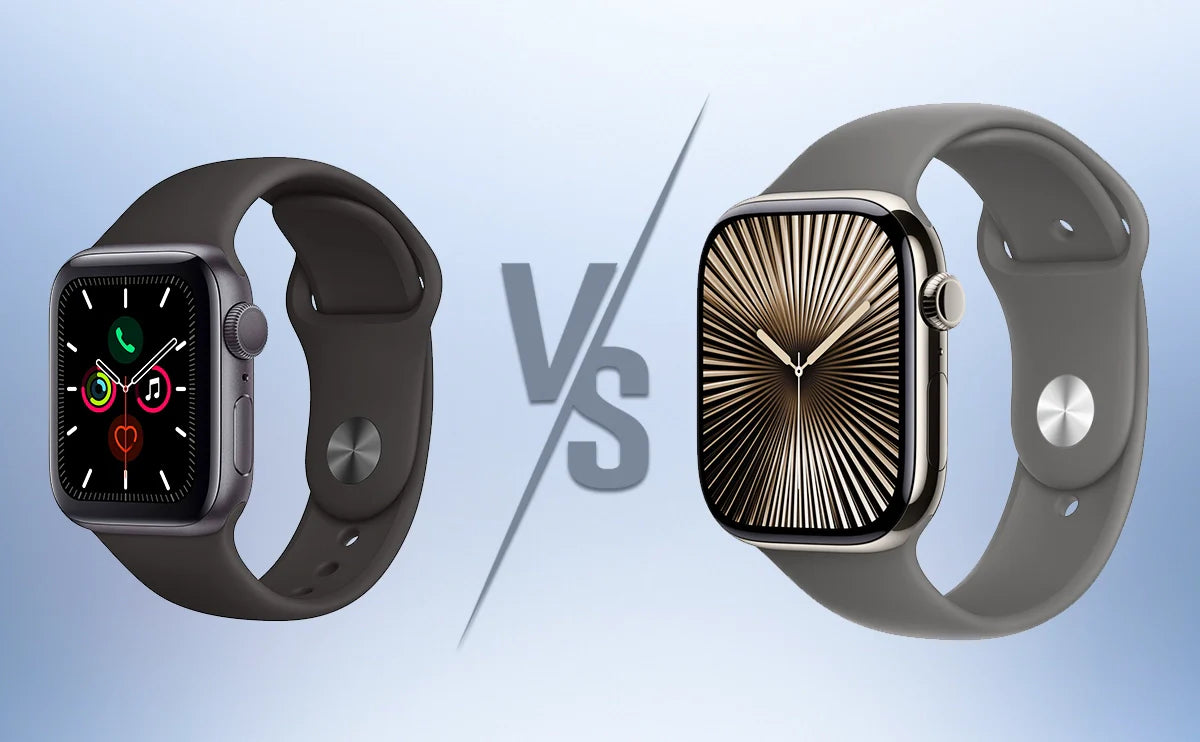
If you’re using an Apple Watch Series 5, this guide helps you decide whether upgrading to Series 10 is actually worth it. We focus on real-world changes that matter day to day - not just specs.
Main content:
- Who This Upgrade Guide Is For (and Who Can Skip It)
- Short Answer – Is Upgrading from Series 5 to Series 10 Worth It?
- Comfort and Design – It’s Not Just Bigger, It’s Thinner
- Display Experience – Why the Series 10 Screen Feels Like a Real Upgrade
- Battery Life and Fast Charging – The Upgrade That Changes Daily Habits
- Performance and Interaction – Does Series 10 Actually Feel Faster?
- Health Features – What You Gain, What You Might Lose
- Band Compatibility and Sizing – Will Your Old Bands Still Work, and Which Size Should You Choose?
- Final Verdict – Should You Upgrade from Apple Watch Series 5 to Series 10?
- The Bottom Line
- FAQs about Apple Watch Series 5 vs Series 10
If you’re searching Apple Watch Series 5 vs Series 10 upgrade, you’re likely dealing with the same two frustrations: your Series 5 battery health has dropped below 80%, and it no longer supports watchOS 11. What used to be an all-day smartwatch now needs constant charging, and software support is clearly coming to an end.
The real question isn’t whether the Series 10 is newer. If you want a full breakdown of what’s new, this Apple Watch Series 10 review covers the design, battery, and daily experience in detail. It’s whether upgrading from S5 to S10 delivers a noticeable, everyday improvement, or if it’s just another expensive but ultimately boring incremental update.
This isn’t a spec sheet comparison. If you’re also curious how this compares to a more recent model, our Apple Watch Series 10 vs. Series 9 comparison breaks down the differences.
In this guide, I’ll focus on the six things long-time Series 5 users actually care about: real-world battery and fast charging, wrist comfort and thickness, screen size and readability, day-to-day performance and smoothness, meaningful health feature changes, and band compatibility plus regional feature differences - so you can make a confident upgrade decision.
Who This Upgrade Guide Is For (and Who Can Skip It)
This guide is written specifically for Apple Watch Series 5 owners deciding whether it’s time to upgrade.
You’ll get the most value from this article if:
- Your Series 5 no longer lasts a full day, especially with workouts
- Battery health is below 80% and charging anxiety is part of your routine
- You care about losing watchOS 11 features and future software support
- You’re unsure whether Series 10’s larger, thinner design will feel better on your wrist
- You can safely skip this upgrade (for now) if:
- You recently replaced your Series 5 battery and it still meets your needs
- You mainly use your watch for time, notifications, and light activity
- You’re tempted to upgrade out of curiosity, not because of a real problem
This guide isn’t about chasing the newest Apple Watch- it’s about whether upgrading actually solves the problems Series 5 owners face today.
Short Answer – Is Upgrading from Series 5 to Series 10 Worth It?
For most Series 5 users, yes- but it isn’t mandatory for everyone.
If your battery is worn down and software support matters to you, Series 10 feels like a real reset, not just a refresh. The biggest gains come from fast charging, everyday smoothness, improved screen readability, and long-term usability.
If your Series 5 is still running comfortably and battery life isn’t a daily issue, Series 10 won’t change how you use your watch - it will simply make everything a bit nicer. For a more budget-friendly middle ground, see how it compares in our Apple Watch Series 10 vs. Series 8 guide.
The sections below explain exactly where the upgrade feels significant, where it doesn’t, and who should upgrade now versus wait.
Comfort and Design – It’s Not Just Bigger, It’s Thinner
A common assumption about the Apple Watch Series 10 is that it’s simply a larger version of what came before. Moving from 40/44mm on Series 5 to 42/46mm, many people- especially those with smaller wrists- worry the upgrade will feel bulky or overwhelming.
In practice, the defining change isn’t size. It’s thickness.
At just 9.7mm thick, the Series 10 sits noticeably closer to the wrist than Series 5. That difference shows up immediately in everyday wear. The watch feels less top-heavy, slides under shirt cuffs more easily, and is more comfortable during long days or when worn overnight. Rather than feeling like a thicker block strapped on top of your wrist, the Series 10 feels flatter, better balanced, and more natural to wear.
This thinner profile also changes how the larger sizes feel in real life. On a slimmer wrist, the 46mm case can look big at first glance, especially if you’re coming from a 40mm Series 5. But because the watch is thinner and better distributed, it doesn’t feel as intrusive as the numbers suggest. Many users find that after a day or two, the larger size feels normal- sometimes even preferable.
If your 40mm or 44mm Series 5 already felt perfectly sized, the safest approach is to try both 42mm and 46mm in person. The reduced thickness means sizing up is more comfortable than before, but wrist shape and personal preference still matter.
Key takeaway:For Series 5 users, the Series 10 upgrade isn’t about making the watch feel bigger- it’s about making it feel less noticeable on your wrist, even as the overall footprint increases.

Display Experience – Why the Series 10 Screen Feels Like a Real Upgrade
On paper, display upgrades are easy to dismiss as numbers. In daily use, the jump from Apple Watch Series 5 to Series 10 feels much more practical than technical.
Series 10 uses a LTPO3 wide-angle OLED display, designed to stay readable even when you’re not looking at it straight on. Compared to Series 5, side-angle brightness improves by up to 40%, peak brightness reaches 2000 nits, and the screen can dim all the way down to 1 nit in dark environments. These changes matter because they address how people actually glance at their watches throughout the day.
Outdoors, the difference is immediate. When running, cycling, or walking in bright sunlight, you rarely raise your wrist perfectly flat. With Series 5, viewing the screen from an angle often means washed-out text or a second glance. With Series 10, workout metrics stay readable even when you lift your wrist halfway or glance from the side. Checking pace, heart rate, or navigation feels quicker and more natural.
At night, the upgrade works in the opposite direction. With brightness dropping to 1 nit, the always-on display is far less harsh in dark rooms. If you’ve ever checked the time in bed and felt your Series 5 light up the room more than you wanted, Series 10 feels noticeably gentler on the eyes- especially if you wear your watch overnight.
Screen size contributes quietly but consistently. The 46mm Series 10 offers 1220 square millimeters of display area, while the 42mm model provides 989 square millimeters. In practice, that extra space reduces visual crowding. Notifications are easier to scan, and on-screen interactions- like typing on the keyboard or adjusting settings- require less precision, which cuts down on mis-taps during everyday use.
What stands out is how consistent real-world feedback has been. Across hands-on impressions, the same theme comes up: the Series 10 display isn’t just brighter at its peak- it stays clear from more angles, in more lighting conditions, with less effort. Whether you’re running outdoors, driving, or carrying groceries and glancing down at your wrist, the screen works with you instead of demanding your attention.
Key takeaway: For Series 5 users, the Series 10 screen upgrade isn’t about hitting higher brightness numbers- it’s about making information easier to see at a glance, in real life, without changing how you use your watch.

Battery Life and Fast Charging – The Upgrade That Changes Daily Habits
For many Series 5 users, battery life is the biggest daily frustration. After years of use, the watch often struggles to last a full day- especially if you work out- turning charging into something you constantly have to think about.
This is where Series 10 feels fundamentally different. While Apple still lists similar all-day battery estimates, fast charging changes how you use the watch. Series 10 can reach 80% in about 30 minutes, and just 8 minutes of charging is enough for up to 8 hours of sleep tracking. When needed, low power mode can stretch battery life to as long as 36 hours.
The impact shows up immediately in everyday routines. In the morning, a 15–30 minute charge while you shower and get ready is enough to comfortably power the entire day, without worrying about whether you’ll make it to bedtime.
After workouts, the difference is just as clear. Series 5 users are used to seeing battery drain spike after exercise, then wondering if the watch will survive the evening. With Series 10, a short top-up after your workout removes that anxiety completely.
At night, fast charging removes the final compromise. Instead of choosing between charging overnight or wearing the watch to sleep, an 8-minute charge before bed is all it takes to track sleep reliably. Sleep tracking stops feeling like a hassle and becomes easy to use consistently.
This is why many long-time users describe fast charging as the real game changer. Series 5 often can’t reach its original 18-hour promise anymore. Series 10 doesn’t just restore reliability- it gives you flexibility to charge when it’s convenient, not when you’re forced to.
Key takeaway:For Series 5 users, the Series 10 battery upgrade isn’t about longer quoted battery life- it’s about fast charging that fits naturally into your day and finally eliminates battery anxiety.

Performance and Interaction – Does Series 10 Actually Feel Faster?
Performance upgrades are easy to oversell. What matters is whether you can actually feel them. Moving from Series 5 to Series 10, powered by the S10 SiP, the improvement isn’t dramatic- but it is consistent.
The speed difference shows up in everyday tasks. Apps open more quickly, scrolling feels steadier, and animations drop fewer frames. These are small gains, but they add up. Over a full day of use, the watch simply feels more responsive and less hesitant than Series 5.
Siri is where the upgrade becomes more obvious. With on-device Siri, common requests like setting timers, starting workouts, or controlling music respond faster and more reliably. There’s a privacy benefit as well, but the real advantage is that Siri feels dependable instead of occasionally laggy.
Interaction improvements are more situational. Double Tap can be genuinely useful when one hand is busy- carrying groceries, holding a coffee, or managing a stroller. In those moments, it feels smart and convenient.
However, it’s not for everyone. Double Tap takes time to learn, doesn’t work everywhere, and can misfire. Some users adopt it quickly; others barely use it. It’s a nice bonus, not a core reason to upgrade.
Overall, Series 10 doesn’t reinvent how the Apple Watch works- it removes friction. Compared to Series 5, everything feels smoother and more predictable, even if the change isn’t immediately exciting.
Key takeaway:For Series 5 users, the Series 10 performance upgrade is noticeable but subtle. Faster app launches, smoother scrolling, and more reliable Siri improve daily use- but they’re a refinement, not a standalone reason to upgrade.

Health Features – What You Gain, What You Might Lose
Health features are where Series 10 looks like a big leap from Series 5- but only if they match what you actually care about. Some additions are genuinely useful, while others require a bit of caution.
The most practical upgrade is the temperature sensor, which tracks wrist temperature during sleep. This isn’t a number you check daily. Its value comes from long-term trends, enabling more advanced cycle insights and offering subtle signals about overall health- something Series 5 can’t provide.
Another meaningful addition is sleep apnea notifications. Series 10 monitors breathing disruptions during sleep and can alert you to patterns consistent with sleep apnea. It’s important to be clear: this is not a diagnosis. It’s an early warning designed to encourage medical follow-up, not replace it.
For swimmers and water activity fans, Series 10 also adds a water temperature sensor and depth gauge. These features won’t matter to everyone, but they’re a clear upgrade for anyone who spends time swimming, snorkeling, or training in open water.
Blood oxygen (SpO₂) tracking is where expectations need to be managed. From a specs standpoint, Series 10 includes a blood oxygen sensor and app. However, in the U.S., some newer models have had this feature disabled or limited due to patent disputes. There have been reports of partial changes via software updates, but availability can still vary by region, purchase timing, hardware batch, and system version. If SpO₂ matters to you, it’s best to confirm current support in your country before buying.
Compared to Series 5’s basic heart rate, ECG, and fall detection, Series 10 takes a more proactive approach- looking for trends rather than just logging data. That shift can be valuable, but only if these insights fit your needs.
Key takeaway: For Series 5 users, Series 10’s health upgrades matter most if you want deeper sleep insights, temperature trends, or water activity data. Blood oxygen tracking requires extra caution due to regional differences, and while none of these features alone justify upgrading, together they make Series 10 far more health-focused than Series 5.

Band Compatibility and Sizing – Will Your Old Bands Still Work, and Which Size Should You Choose?
If you’ve been using an Apple Watch Series 5 for years, you’ve likely built up a collection of bands. Fortunately, upgrading to Series 10 doesn’t mean replacing them all.
Apple groups watch bands by connector size, not by model year:
- Small size group: 38mm / 40mm / 41mm / newer 42mm (Series 10)
- Large size group: older 42mm (Series 0–3) / 44mm / 45mm / 46mm / 49mm
In practical terms, if you’re moving from a 40mm Series 5 to a 42mm Series 10, or from 44mm to 46mm, your existing bands from the same size group will continue to fit. This applies to many third-party options as well, including everyday bands such as Bandletic Apple Watch Series 5 Straps, which are designed around the same Apple size group system and are commonly reused by upgraders.
There is one small detail worth knowing. The Series 10 case is slightly wider, so some older bands- especially flat or rigid designs- may look a bit narrower at the connector. It doesn’t affect comfort or security, but visually it can be noticeable. Newer designs, including Bandletic Apple Watch Series 10 Straps, are often proportioned with the updated case dimensions in mind, which can result in a more balanced look.
Extra care is needed with Solo Loop and Braided Solo Loop bands. Because they rely on precise sizing rather than adjustment, the thinner Series 10 case can subtly change how they feel. If your Solo Loop was already borderline tight or loose on Series 5, re-checking sizing- or switching to an adjustable band- can avoid discomfort.
Choosing the right case size matters just as much as band compatibility:
- Smaller wrist + previously used 40mm: start with 42mm. The 46mm can feel visually striking at first.
- Previously used 44mm: most users adapt quickly to 46mm, though trying it on in person is still recommended.
For many upgraders, the simplest approach is keeping familiar bands for daily use and adding one Series 10–optimized strap for a cleaner fit and updated look.
Key takeaway: For Series 5 users, most existing bands- including quality third-party options like Bandletic Apple Watch Series 5 Bands- will work with Series 10. The real choice comes down to comfort and appearance, and newer options such as Bandletic Apple Watch Series 10 Bandscan better match the updated case proportions if you want a more refined fit.

Final Verdict – Should You Upgrade from Apple Watch Series 5 to Series 10?
After five years, the decision to upgrade isn’t about chasing the newest Apple Watch- it’s about whether your current one still fits your life. The easiest way to decide is to look at how often Series 5 is getting in your way.
You should upgrade to Series 10 if any two of the following are true:
- Your battery health is below 80%, or you regularly need to charge your watch more than once a day
- You work out frequently or want reliable sleep tracking without battery anxiety
- You want a larger, brighter screen that’s easier to read outdoors and at a glance
- You value smoother performance, faster interactions, and on-device Siri that feels more dependable
For these users, Series 10 doesn’t feel like a minor refresh. Fast charging and the improved display are the two upgrades you feel immediately, every single day. Some users also consider going bigger - this Apple Watch Series 10 vs. Ultra 2 comparison explains who Ultra 2 actually makes sense for. Together, they remove the friction that has quietly built up with Series 5 and make the watch feel effortless again.
You can keep using Series 5 (for now) if this sounds like you:
- You recently replaced the battery, and it still lasts comfortably through the day
- You mainly use your watch for time, notifications, and light activity
- You’re not interested in newer watchOS features or deeper health insights
In this case, upgrading isn’t urgent. Series 10 will feel nicer- but not necessary.
That said, it’s worth keeping one thing in mind: Series 5 no longer receives major watchOS updates. If you’re thinking about waiting another cycle, our Apple Watch Series 11 vs 10 comparison explains what’s likely worth holding out for.
Over time, new features, app compatibility, and system improvements will continue to move forward without it. This doesn’t mean Series 5 suddenly stops working - but the gap will gradually widen.
The Bottom Line
If your Apple Watch Series 5 is starting to feel like something you manage instead of something you just wear, Series 10 is a meaningful upgrade. It fixes the two biggest pain points- battery anxiety and screen usability- while making everything else feel smoother and more reliable.
If your Series 5 still fits your routine without friction, you can comfortably wait. But if daily compromises have become normal, upgrading to Series 10 isn’t about getting something new- it’s about getting back to how your Apple Watch used to feel.
That’s when the upgrade truly makes sense.
FAQs about Apple Watch Series 5 vs Series 10
Is upgrading from Apple Watch Series 5 to Series 10 worth it?
Yes, if your Series 5 battery is worn down or you want faster charging, a brighter screen, and longer software support.
How fast does Apple Watch Series 10 charge?
Series 10 reaches about 80% in 30 minutes, and 8 minutes is enough for sleep tracking overnight.
Can Apple Watch Series 5 bands be used on Series 10?
Yes. Bands are compatible by size group, so same-size Series 5 bands usually fit Series 10.
Should I choose 42mm or 46mm for Series 10?
Choose 42mm if you used 40mm or have small wrists; choose 46mm if you used 44mm.
Is the Series 10 screen much bigger than Series 5?
Yes. The display is larger, brighter, and easier to read at a glance, especially outdoors.
Does Apple Watch Series 10 still support blood oxygen in the U.S.?
It depends. Some U.S. models have SpO₂ limited due to patent disputes, so availability varies.
Is the Series 10 upgrade just a minor improvement?
It’s subtle but meaningful, mainly reducing battery anxiety and improving everyday usability.
Should I buy Apple Watch Ultra 2 instead of Series 10?
Only if you need extreme durability; for most users, Series 10 is slimmer and more practical.

Share:
Garmin Venu 3 vs Forerunner 265 - Which One Fits Your Life?
Garmin Instinct 3 Amoled vs Solar - Which One Should You Actually Buy?